

In this digital era, your SEO is incomplete without technical SEO. Ensuring your technical SEO can help you get high sales, conversions, and revenue.
No matter what industry you are in… Technical SEO has never been more important. Because, these are the configuration implementation on the website and server that helps search engine crawlers to perfectly index your site.
Unlock Your Free SEO Audit Now
Unlock your website’s full potential! Get a FREE SEO Audit with 60+ checks. Don’t miss insights for online success.
Get a Free AuditTo ensure you step forward with the right strategies, here we have a refined technical SEO checklist.
Template For Technical SEO
With a decade of experience Incrementors has served more than 1500+ clients only in the USA. And, in the past 10 years, we have heard our clients asking the same question, “Is my website alright with the technical SEO?”
This is the question business owners are most bothered with.
And… this is also very obvious. That’s why I am here. A deep technical SEO audit can help you when it is about the technical SEO of your site in order to increase search engine visibility.
Down, I’ve provided a free Technical SEO Audit Template that makes the process of the technical SEO audit of your site. This template will help you find the major issues on your site that influence ranking, indexing, and visibility.
Click on the download button to get template. And, don’t forget to make a copy to make edits on it.
Hope it will be helpful!
In this Technical Site Audit template, I have discussed various technical issues, but right now, I am going to discuss some major technical SEO issues that needs to be resolved as soon as possible.
Technical SEO Checklist You Must Follow
Let’s see some major parts of Technical SEO below.
Improve Your Page Experience With Core Web Vitals
Providing the users with a good “Good User Experience” must be the top priority of your site as it is one of the ranking factors. Core Web Vitals shows you the performance of the pages in real-time.
According to Google, 24% of people are less likely to abandon your website when using it.
Core web vitals has their own search signals, which are:
- Mobile-friendliness
- Safe-browsing
- HTTPS security
- Intrusive interstitial guidelines.
Core Web vitals consist of three factors.
First Input Delay: FID measures when the user interacts with the first page. To have a good user experience, ensure the page has FID of less than 100MS
Largest Contentful Paint: LCP measures the loading performance of contentful elements on the page screen. This must take 2.5 seconds.
Cumulative Layout Shift: This is to measure the visual stability of the screen. This should happen in less then 1 seconds.
These ranking factors are easily measured by Google Search Console and shows you the pages with possible issues.
There is one tool that can help you with the site speed and core web vitals, i.e., Google Pagespeed Insights.
Check Out For Crawl Error
The next big thing after core web vitals is checking out for the crawl errors. Of course, you want to be sure your site is crawl error-free.
Basically, it’s an error when search engine bots try to crawl a page but are unable to do it.
You can use tools like, screaming frog to pick such errors and resolve them.
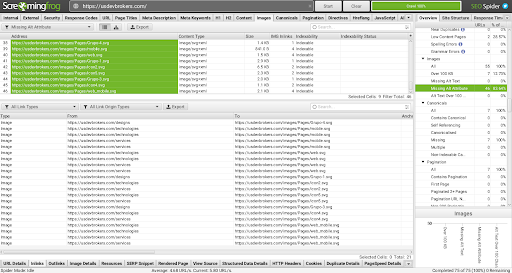
Or, you can use Google Search Console to get those crawl errors. After you find the crawl errors:
- Implement the 301 redirects correctly.
- Go through 4xx or any 5xx error page to find out where you want to redirect it to.
Fix Broken Links
Broken links can affect the user-experience for users and search engines as well. It could be very much frustrating for users to click on the link and realize it doesn’t get them to the correct page where they were expecting.
Broken links could be both internal links and external links. This could happen due to various factors like,
- Redirecting links of 301 or 302 to another page.
- Links directing to the 4xx error page
- Orphaned pages
These could be the reasons behind broken links.
Broken links could be both internal links and external links.
Fix External Backlinks
There are two ways to fix external backlinks:
- Remove the backlink completely
- Replace the link with another content
Fix Internal Backlinks
- If the broken link is due to typos. The solution is simple, check out, if the broken link is due to the typos error in the URL…. fix the misspelling and you are done.
- Create a new page again.
- Redirect the page with 301 redirects. What you need to do is to redirect the page with relevant content.
- Delete the page with a broken link.
Get Rid Of Thin Or Duplicate Content
Thin content or duplicate content is what Google never welcomes. Duplicate content can have multiple meanings, but the one we refer to stands for Internal duplicate content which is the same content used on multiple pages…
This can happen due to having multiple versions of the live site live, or having copied content on the website.
Here, it is important that you allow Google to crawl and index only a version of your website. Let’s say, you could have many versions of your site.
- https://www.xyz.com
- https://xyz.com
- http://www.xyz.com
- https://xyz.com
No worries!
You can fix duplicate content with all these strategies:
- Have a 301 redirect for your single primary URL.
- Implement canonical tags for duplicate pages
- Set preferred domain in Google Search Console
- Or, delete the duplicate content or page
Check If Your Site Is Mobile-Friendly
The reason why Google prefers Mobile-friendly sites over other websites is that 50% of the users worldwide use their mobile phones to surf the internet. You must know that Google has prioritized mobile indexation.
So, that’s why, it is the need of an hour…to have a website optimized for mobile devices.
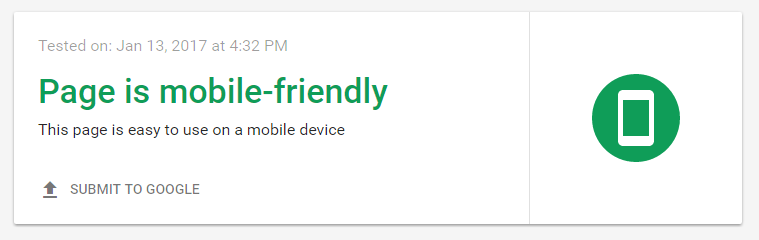
That means, it is required to have a responsive design in the mobile version. Check out if your site is mobile friendly or not: Google mobile friendly test.
Secure Your Site With SSL
Do you know, back in 2014, Google declared HTTPS a ranking factor? So, basically, if your site is not having an SSL certificate, it is the high time you switch to it.
Of course, HTTPS is there to protect visitors’ data on your site and provides protection from data breaching and hacking.
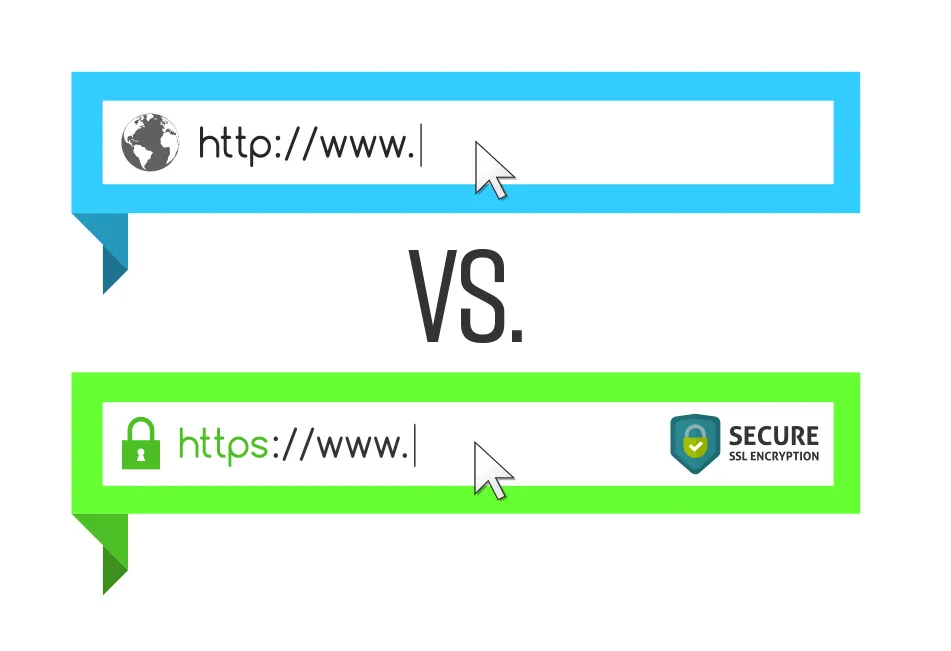
Not only does an SSL certificate helps you with better rankings… but also helps with a good user experience.
Users mark websites with “HTTP” as “unsafe”, which ultimately leads to poor user experience which makes the user never return to the site.
Having an SSL certificate builds a sense of trust between the webmaster and the visitors. This increases the user’s confidence in your website.
Check Your Site’s Loading Speed
“If your site has a slow loading speed, you are more likely to lose your visitors”. On average, you could lose 50% of the users if your site takes more than 3 seconds to load.
A fast loading speed means, having higher conversions and high CTR with a lower bounce rate. You can even use Google’s free tool to check your website speed.
You can see the charts to understand how the website is performing. Like this:
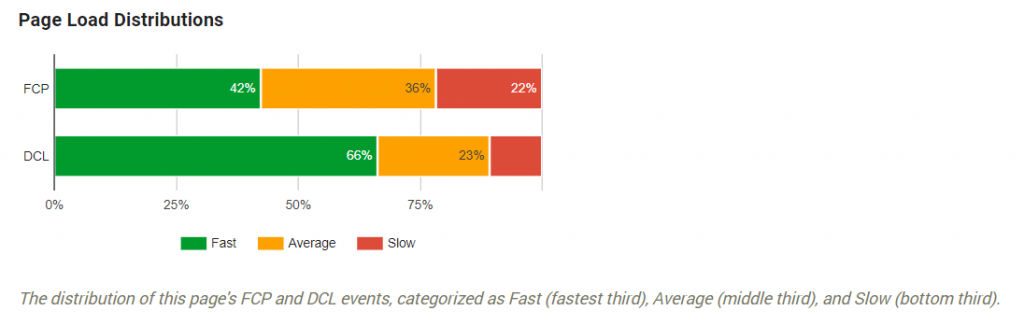
Even Google says, “There are dozens of potential factors which may slow down the response of your server: slow application logic, slow database queries, slow routing, frameworks, libraries, resource CPU starvation, or memory starvation.”
Here are the ways to improve site load speed:
1. Get fast hosting services. Take service from the high-performance server.
2. Use CDN. It is a geographically distributed group of servers to boost your site speed.
3. Reduce the number of HTTP requests.
4. Optimize the images for fast load speed.
5. Reduce CSS and Javascript.
Make Sure The URLs Are In Good Structure
Google has declared, the URL should be as simple as possible. And once you have created a URL of the page, it is not a good idea to change it after that. That means, you need to get it right the first time.
It is good to have a descriptive keyword for the users and search engines as well.
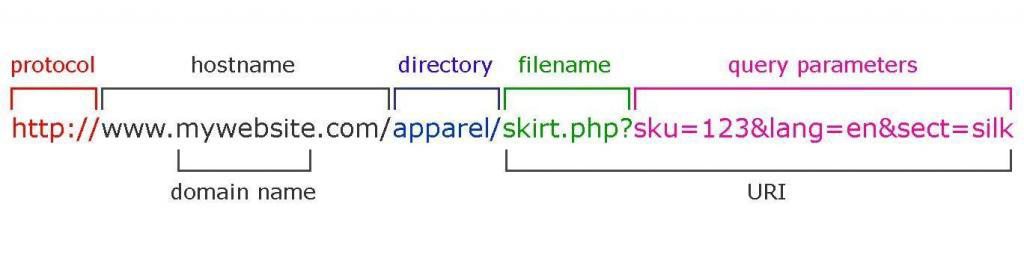
Many webmasters use dynamic URLs, which is of course not that bad, but there will come a point where you will need to merge to new URLs to improve performance. Also, avoid having query parameters in the URL as you can’t track that URL on Google Search Console and Google Analytics as well.
You will lose the backlink opportunity, if the URL is looking like this:
WordPress gives you the option to add a personalized permalink structure.
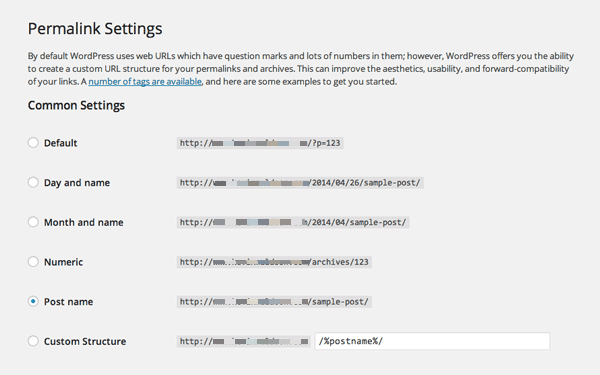
Just follow these points while creating a URL.
- Use (-) instead of (_).
- Keep it simple, short and concise
- Make it descriptive and use focused keywords in it.
Read More: How To Create An SEO-Friendly URL
Check If Your Site Has An Optimized XML Sitemaps
The XML sitemap is there to tell search engines about the URL structure of your site and what to index in SERP through your site.
Exclude the URLs from sitemaps with:
URLs with parameters
URLs that are 301 redirecting
URLs with 4xx and 5xx codes
Duplicate content
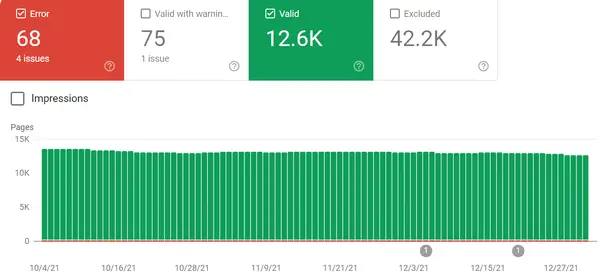
Also, you can check the index coverage report from the Google Search Console:
Check If Your Site Has Optimized Robots.txt File
Robots.txt files are important in giving a way to search engine bots about how to crawl your site.
You have a limited crawl budget, so that’s why you need to make sure, you only allow the indexing of the pages that need to be indexed.
Also, you need to be sure that your robots.txt file isn’t blocking any page that you wish to index.
Here are the URLs that you should disallow in the robots.txt file.
- Temporary Files
- Admin pages
- Cart & checkout pages
- Search-related pages
- URLs that contain parameters
Read More: Best Practices For Robots.txt SEO
Use Structured Data Or Schema Mark Up
The structured data provides information about the webpage and content. It basically, allows Google to understand your web content more clearly. If you are using structured data on your site, Google will make it appear on SERP like this:
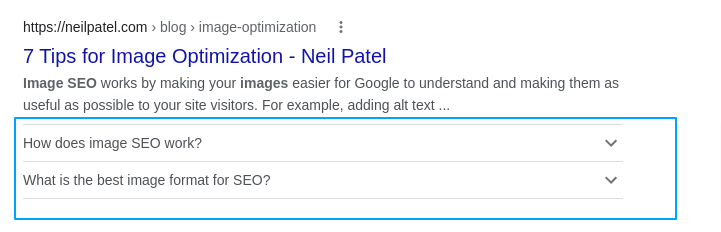
The FAQs that you are seeing here are the results of the schema markup of FAQs.
Besides this, schema marks can also be used for:
- Getting featured as a knowledge graph
- Allowing Google understands contextual understanding of your website.
Conclusion
Here are the most important technical factors that you need to optimize in order to make your website rank higher. There is a template given above, along with a technical SEO checklist.
Use the template and let me know how useful it was for your website. For more other marketing strategies, and SEO techniques, you can go through our other blogs.
Or, book a 30-minute strategy session to contact our SEO experts.
Want to rank #1 on Google?
Get a free SEO audit and discover exactly what's holding your website back.

Shiv Gupta
Founder & CEO, Incrementors
Shiv Gupta is an award-winning digital marketing strategist and creator of the 'FastTrack CRO' methodology. Recognized as a Thought Leader in ROI-Driven Digital Marketing by Business Connect, he leads Incrementors, which Forbes has recognised as one of the Top SEO Agencies in the World. Incrementors implements integrated growth marketing strategies based on data and ROI measurement. Gupta helps brands of all sizes scale effectively through comprehensive solutions—from AI-driven top-funnel marketing to SEO, email campaigns, and conversion optimization.